
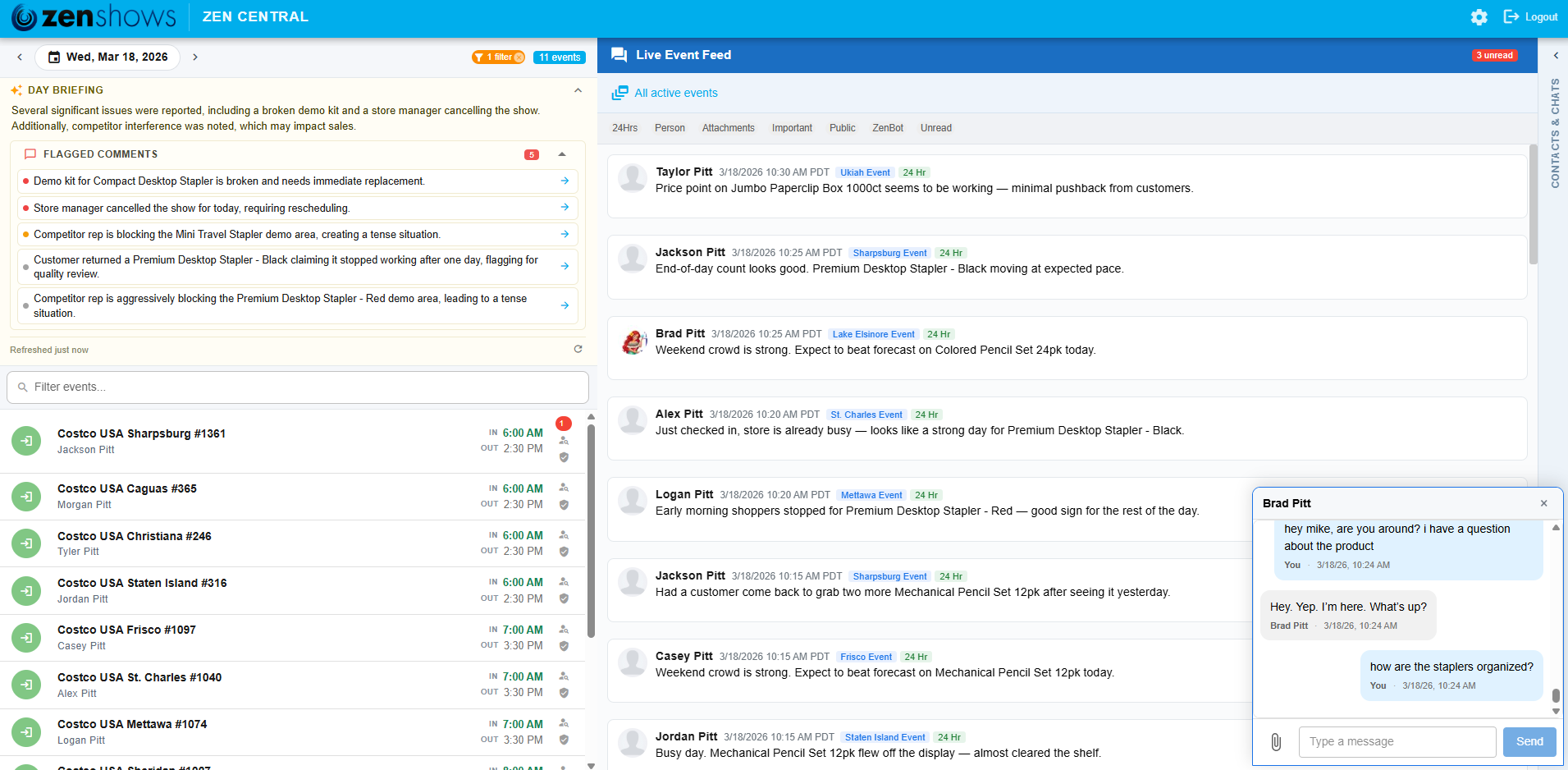
Managing a field team means constantly switching between your event schedule, rep messages, and direct conversations — often across multiple browser tabs, phone calls, and email threads. Zen Central is built to end that.
It’s a dedicated command center designed to live in its own pinned browser tab. Open it at the start of your day, leave it running in the background, and it keeps you connected to everything happening in the field — no refreshing, no drilling into individual event pages.
Everything on one screen
The layout is built around three panels that work together:
Left — Today’s Schedule. Every event running across all your stores, with color-coded status icons showing whether each rep has checked in, checked out, or gone quiet. A date bar at the top lets you step forward or backward through the calendar without navigating away from the screen. At the very top of this panel, an AI Day Briefing reads your entire day’s field activity and surfaces only what actually needs your attention — late check-ins, missing check-outs, compliance flags — ranked by severity so the most urgent issues are always first.
Center — Live Event Feed. A real-time stream of comments and field updates from every active event. Click any event in the left panel to focus the feed on that event, or click a rep’s icon to filter it to their messages only. You can compose and send a reply directly from this screen without ever opening the full event page.
Right — Direct Chat. All your contacts and open conversations in one place. Chat windows open in the bottom-right corner of the screen and can be dragged to reorder, so they stay out of the way of the content you’re monitoring.
Everything updates via WebSocket the moment it happens in the field. No refresh needed.
Already in active use
The real-time chat running through Zen Central isn’t new — it’s been in production for a while. Here’s what the last 90 days looked like across all vendor teams with access:
| Active chat rooms | 2,856 |
| Messages sent | 74,400 |
| Unique active users | 546 |
| Vendor companies using live chat | 10 |
How to use it
- Log in at zenshows.com and open Zen Central from the top navigation.
- Pin the tab (right-click the tab → Pin). Zen Central is meant to run all day alongside everything else you have open — think of it as a second monitor for your field operations.
- The view loads to today’s date automatically. Use the ← → arrows to step through your schedule.
- Click any event row to focus the Live Event Feed on that event’s messages.
- Click the person icon on an event row to filter the feed to a specific rep.
- Use the Direct Chat panel on the right to message anyone on your team. Drag chat windows out of the way if they overlap anything you need to see.
Leave it running. It updates itself.