
A note from the office should not turn into a search. The rep is on the floor. The manager is in Zen Central. The answer should land in the same place the question started.
That is the idea behind Rep Threads, now opening for beta with ZenShows vendors.
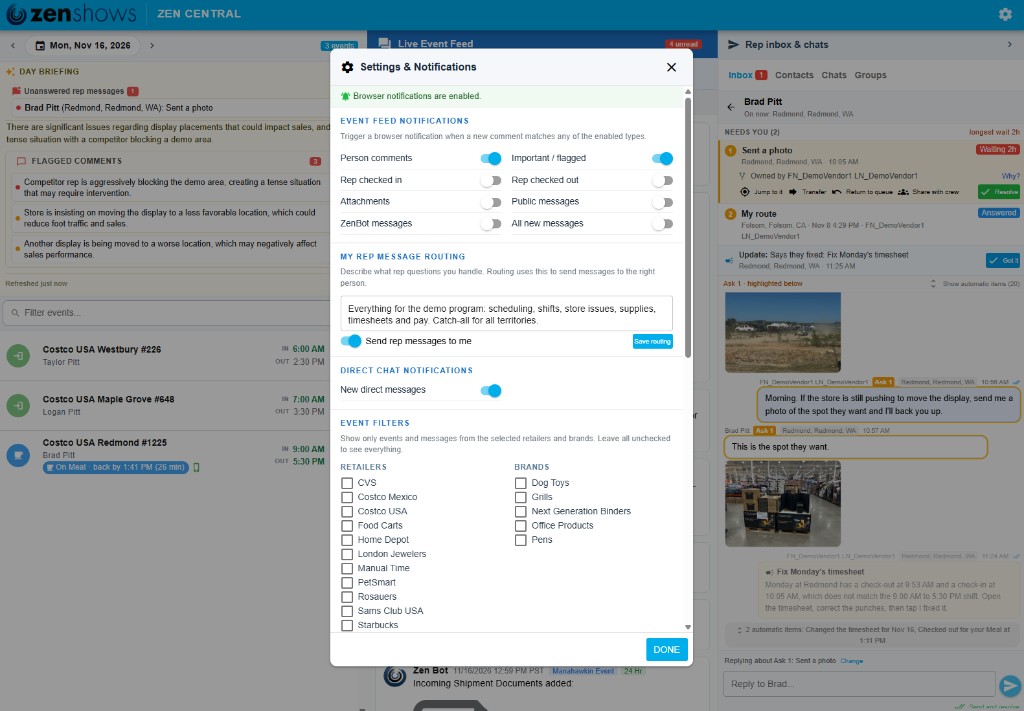
Each rep gets one private conversation with the company inside the ZenShows app. A message from the office, a reply from the floor, a photo of a display, and the day’s check-in all stay in that thread. On the office side, those conversations arrive in the Rep Inbox in Zen Central, with a waiting time and a clear owner.
One inbox for the people who need an answer
Zen Central already shows the day: who is on the schedule, who has checked in, and what the field is saying. Rep Threads add the conversation to that same screen.
The day briefing calls out unanswered rep messages. The inbox sorts them into what is yours, what the team is handling, and what nobody has picked up yet. Open a rep, and you see the complete conversation: the office request, the rep’s reply, photos from the floor, timesheet requests, and automatic work activity. Claim it, hand it to a teammate, or mark it resolved when the answer is done.
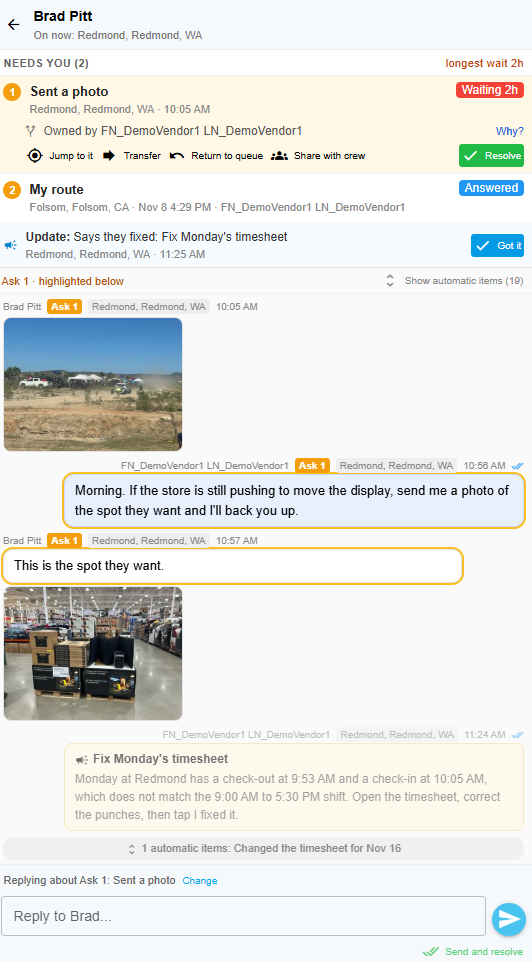
The office can send any question, request, reminder, or document through this thread. The rep does not have to know which inbox it landed in. They see one company conversation on their phone.
It lands with the right person
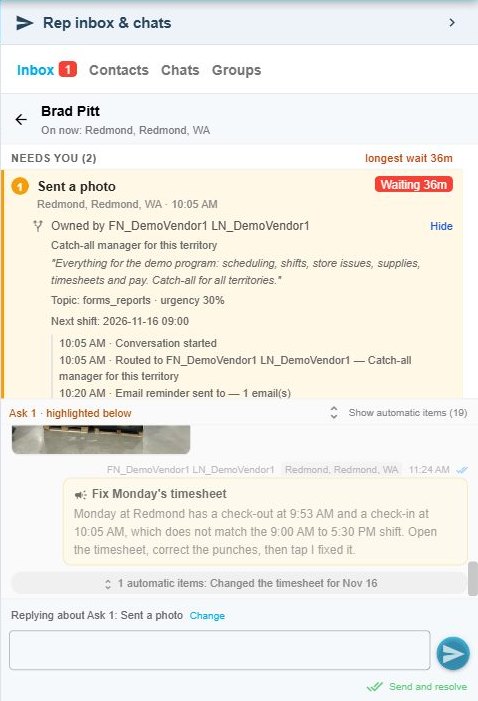
Each manager describes the work they handle — scheduling, store issues, timesheets, pay, or a particular territory. Rep Threads uses those responsibilities to send a new item to the right person. If someone is already helping that rep, the next reply stays with them.
Every item has a Why? view. It shows the responsibility that matched, the owner, the topic and urgency, and the history of routing and reminders. Managers can see why an item reached them instead of guessing.
Alerts that follow the work
Zen Central raises unanswered messages in the day briefing, adds an inbox badge, sorts the longest wait first, and can show a browser notification. If nobody responds, the history records the reminder. On the phone, app notifications bring time-sensitive work to the rep even when the app is closed.

Your agent can work the inbox too
Rep Threads includes a Model Context Protocol (MCP) interface for authorized agents. Your agent can review the Rep Inbox and conversation history, inspect photos or documents, reply to a rep on your behalf, start a message, and help claim, transfer, or resolve inbox work. The same staff permissions and company boundaries still apply, so the agent works inside the access you give it.
A timesheet note the rep can fix
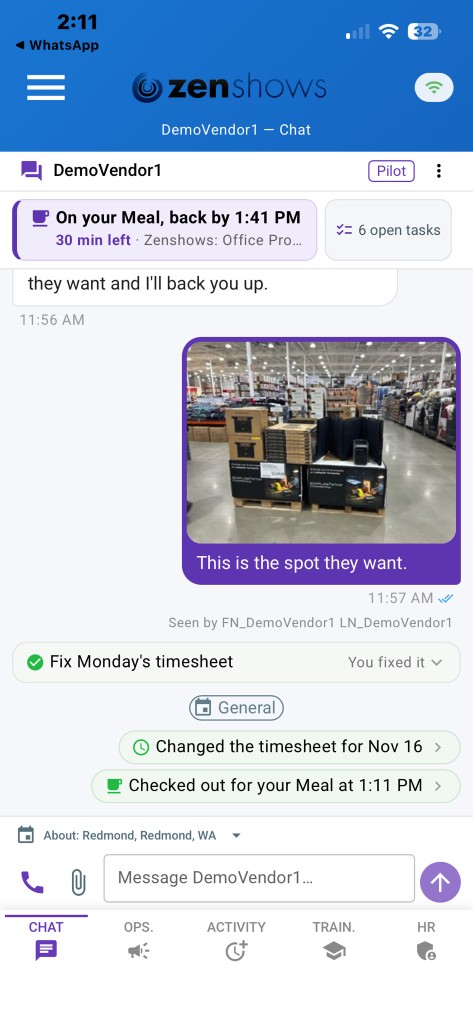
A timesheet problem can arrive in the same conversation as any other office message. The rep opens the timesheet directly from the request, corrects the day, and marks it fixed. The resolution comes back to Zen Central, while check-in, break, and check-out activity is recorded in the thread automatically.
The floor, in the same thread
Reps can answer in a sentence or send a photo of the spot the store wants to use. The picture appears in the same conversation on the phone and in Zen Central, so a manager can see the floor without opening a separate text thread.
Check-in, break, and check-out stay in the app, where reps already use them. That activity shows up in the thread, so the office can read the conversation and the day’s punches together. A weak store signal does not block the work: a message waits on the phone and sends when the connection returns, and events, check-in, and tasks keep working offline.
What beta participants can try
- Open one company conversation with each rep from the ZenShows app.
- Send and receive messages and photos in that thread.
- See unanswered messages in the Zen Central day briefing.
- Work the Rep Inbox: yours, the team’s, and anything still unowned.
- Reply, claim, transfer, or resolve without leaving Zen Central.
- Watch check-ins, breaks, and check-outs appear alongside the conversation.
- Send a message on a poor connection and have it go out when the phone is back online.
Join the Rep Threads beta
We are inviting ZenShows vendors to try Rep Threads with a real team and tell us what the conversation should do next.
Because this is a beta, we turn it on company by company. Reps on a current app see the conversation. Everyone else keeps the messages they have today.
Want to try it? Email hello@zenshows.com and ask to join the Rep Threads beta. Tell us which team you want to start with, and we will help with the next steps.